
Once you have submitted your booking you have 24 hours to make amendments. You can amend your booking by accessing our Booking Management System.
Access the Booking Management System
Visit our online portal and log in using your username (typically an email address) and password.
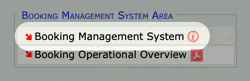
Click on the Booking Management System link:
Edit your booking
Click on the small edit icon next to the ID of the booking you wish to amend:

Please wait for the editing interface to load.
Amend your booking details
Use the booking form to amend any details or add additional information:

Submit your amendments
To submit your amendments, click Update Booking in the top right:

When you click Update Booking a banner will display with the message ‘Updated OK’. This confirms that the amendments to your booking have been submitted:

If you have any issues amending a booking please contact our operations team directly.